
MyCHRISTUS
CHRISTUS HealthMedical
4.041.00 Reviews
- Version
- 3.9.0
- Installs
- 50.00K
- Age Rating
- Everyone
Screenshots
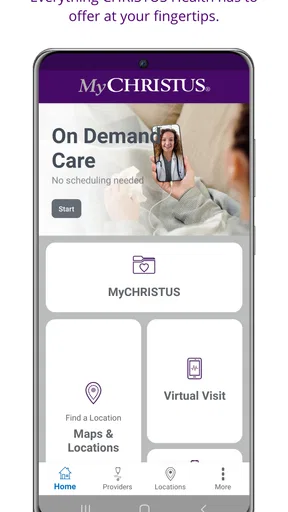
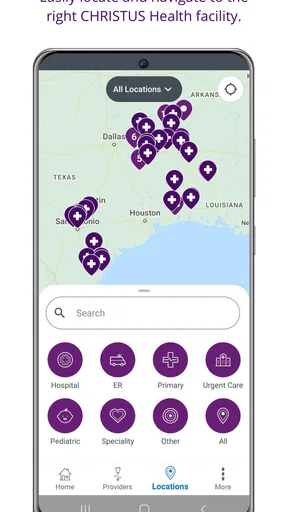
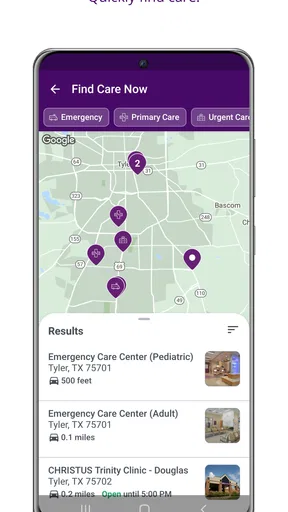
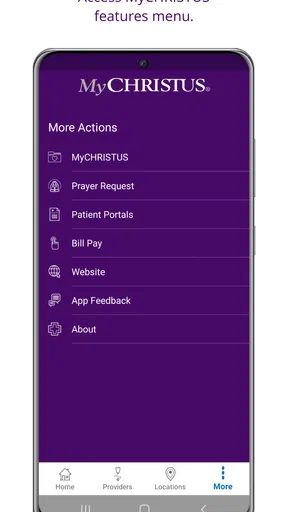
Our Review of MyCHRISTUS
 Analysis by Appyee
Managing healthcare is rarely difficult because of one complicated task. The real problem is usually the scattered routine around it: finding the right place to request help, remembering which details matter, and keeping track of what needs attention next. MyCHRISTUS is designed to bring that routine closer together for people who use CHRISTUS Health. I found it most useful as a central starting point rather than as a replacement for every healthcare conversation.
That distinction matters. A medical app can save time when it helps me reach the right service quickly, but it should not encourage me to treat a digital screen as a substitute for urgent care or professional judgment. My experience with MyCHRISTUS is that its value comes from making ordinary CHRISTUS Health interactions easier to organize. It is a free medical app from CHRISTUS Health, rated for Everyone, and it has passed the early stage of being a niche download: more than fifty thousand people have installed it.
How I use it as a healthcare starting point
My baseline workflow is simple. I open the app when I need to deal with a CHRISTUS Health task, identify what kind of help I am looking for, and use the available route instead of searching through unrelated websites or old messages. That sounds modest, but it is exactly where a healthcare app can earn its place. The best workflow is not the one with the most buttons; it is the one that reduces hesitation when I already have enough to think about.
For example, imagine noticing a non-urgent health issue late in the day. I might first use MyCHRISTUS to orient myself toward the appropriate CHRISTUS Health option, gather the information I will need, and decide whether the matter belongs in an app-based workflow at all. If the situation feels urgent or dangerous, I would not spend time navigating an app. I would use the appropriate emergency service. The app is better suited to planned, routine, or administrative healthcare needs where convenience matters more than immediate intervention.
I also like approaching the app with a small amount of preparation. Before opening it, I think about the exact outcome I want: arranging care, checking a healthcare detail, contacting the right service, or simply understanding what step comes next. This prevents the common mistake of opening a healthcare app without a clear purpose and then wandering through menus. MyCHRISTUS works better when I treat it as a doorway to a known task.
The app’s average rating is 4.0 from more than one hundred ratings, with dozens of written reviews. I would read that as a reasonable sign of usefulness, not as proof that every person will have the same experience. Healthcare apps depend heavily on the user’s relationship with the associated provider, the services available to that person, and the urgency of the request. A smooth experience for a CHRISTUS Health patient may not translate into much value for someone who does not use that healthcare network.
One practical habit is to finish each session with a clear next step. If I have reached the correct department or found the information I needed, I avoid reopening the app repeatedly just to check whether I missed something. If the task still needs follow-up, I make a personal note of what I am waiting for and when I should act again. The application can support the process, but it cannot replace my own responsibility for remembering a medical appointment, monitoring symptoms, or following clinical advice.
The first setup decisions are more important than they look
When I install a healthcare app, I do not rush through the opening screens automatically. I check that I am using the intended CHRISTUS Health application, pay attention to the account or patient context presented to me, and make sure I understand which person or care relationship I am managing. This is especially important in households where one phone may be used by more than one family member.
I also keep my contact details and personal information consistent with the information held by my healthcare provider. If those details are outdated, a digital workflow can become confusing even when the application itself is working correctly. A phone number, email address, or profile detail that no longer matches can create avoidable friction when the app is meant to help me communicate or coordinate care.
MyCHRISTUS is currently at version 3.9.0 and requires Android 10 or later. That requirement is comfortable for many recent devices, but it is still worth checking before planning to use it on an older phone. If a family member relies on an aging device, compatibility may be the first practical question, not the last. I would rather discover that before a time-sensitive healthcare task than during one.
Because the app is free, the decision to try it is relatively easy for an eligible CHRISTUS Health user. Free does not mean frictionless, though. I still recommend installing it before a routine need arises, signing in when I have time, and learning where the main actions are. A first-time setup during a stressful moment is rarely the best way to judge a healthcare tool.
Settings and phone habits that make the experience calmer
I would begin with the app’s account and notification-related settings, using only the alerts that help me act. Too many notifications can make healthcare feel noisy, while too few can cause me to overlook something useful. My preference is to allow reminders that support a real task and silence anything that merely encourages me to open the app without a clear reason.
Notification settings should also be considered at the phone level. On a shared or visible lock screen, healthcare-related previews may reveal more than I want other people to see. I would review whether message content appears in notifications and choose a privacy level that fits my situation. This is not a criticism unique to MyCHRISTUS; it is a sensible precaution for any app connected to personal medical activity.
I also check the phone’s battery and background settings if alerts seem delayed. I would not assume that every delay is caused by the app. Battery-saving modes, restricted background activity, weak connectivity, or an outdated operating system can all affect how dependable a mobile workflow feels. If something important appears late, I would verify it through the appropriate CHRISTUS Health channel rather than relying on a notification alone.
Another useful setting is the device’s accessibility configuration. Larger text, increased contrast, or screen magnification can make a healthcare interface easier to read, especially when I am tired or dealing with a headache. I prefer adjusting the phone so that the app remains comfortable without repeatedly zooming or squinting. These changes are easy to overlook because they are not part of the app’s headline appeal, yet they can make the difference between a calm session and an irritating one.
I would also keep the application updated through the official app marketplace when updates are available and compatible with my device. The current version is 3.9.0, but the important habit is not memorizing that number. It is checking that I am not using an unnecessarily old build when I need a healthcare function to behave properly. At the same time, I would avoid updating immediately before an important appointment unless I have enough time to test the app afterward.
Faster patterns for repeat users
After a few sessions, I stop treating MyCHRISTUS like a place to browse. I use a repeatable sequence: open it, confirm the relevant account context, go directly to the task, review the result, and record any follow-up outside the app if I need a separate reminder. This pattern is faster than exploring every section each time, and it reduces the chance that I will confuse an informational step with a completed healthcare action.
A second shortcut is preparing before I start. For a care-related request, I might write down the main concern, relevant timing, current medications or questions, and the outcome I want from the interaction. I do not expect the app to create that preparation for me. Having it ready makes any digital form or conversation more precise, and it helps me notice when the issue is too complex for an app-based first step.
For recurring household tasks, I would keep a small private checklist rather than depending on memory. The checklist might identify whose account I need, what information I should have nearby, and what I need to confirm before closing the session. This is particularly useful when helping a parent or another family member. It prevents the common error of completing a task for the wrong person or assuming that opening a page means the task is finished.
I also use the app at a calm time to learn the route I would take later. That is not wasted effort. If I already know where to begin, a routine request becomes less stressful, and I can reserve phone calls or in-person visits for situations that genuinely need them. The benefit is not that every healthcare interaction becomes digital; it is that I can make a better choice about which channel fits the situation.
One trade-off is that convenience can encourage overreliance. If I become accustomed to opening the app for every question, I may lose sight of the difference between administrative support, routine care, and urgent medical attention. My rule is straightforward: use MyCHRISTUS to organize access to CHRISTUS Health, but use professional or emergency care directly when the circumstances demand it.
Where the app fits compared with usual alternatives
The usual alternative is a browser search followed by a phone call, a provider website, or an in-person visit. MyCHRISTUS can be more convenient than starting from a general search engine because it is focused on CHRISTUS Health rather than the entire internet. That focus is its main advantage. I spend less time deciding whether a result belongs to my healthcare provider and more time working through the relevant route.
A browser can still be better when I need broad health education, independent medical information, or a service outside CHRISTUS Health. Search is also useful when I do not yet know what kind of care I need, although it requires more judgment because online results vary in quality. MyCHRISTUS is not intended to be a universal medical encyclopedia, and I would not use it that way.
A phone call remains preferable when the situation is complicated, when several details need explaining, or when I need a human being to clarify an exception. Digital forms and menus are efficient for structured requests, but they can become frustrating when my situation does not fit the expected path. In those cases, the app may still help me find the right contact point, but the conversation itself is better handled by staff.
An in-person visit is the better option for examinations, procedures, or concerns that cannot be responsibly assessed through a mobile workflow. MyCHRISTUS can help me prepare for that visit or manage related steps, but it cannot turn a phone into a clinical examination room. That limitation is obvious, yet it is worth stating because convenience can make digital tools seem more capable than they are.
The app is also not the right choice for someone who does not use CHRISTUS Health or who wants a single dashboard covering unrelated providers. A broader health-management service may be more suitable for that person, depending on what they need. MyCHRISTUS makes the most sense when the user’s care is already connected to CHRISTUS Health and the goal is easier access to that specific network.
Limits I would keep in mind
The first limitation is scope. This is a provider-focused medical app, not a replacement for a primary care relationship, emergency service, pharmacist, or specialist. Its usefulness depends on having a relevant reason to interact with CHRISTUS Health. If I rarely use those services, the app may not deserve a permanent place on my home screen.
The second limitation is that digital convenience does not remove the need to verify details. I would carefully review names, dates, locations, and the intended action before confirming anything. A rushed tap can create confusion, especially when managing care for another person. The app may streamline access, but I remain the final checkpoint for whether the request is accurate.
Connectivity and device conditions can also affect the experience. I would not wait until I am in a poor-signal area to discover that I need the app. For important appointments or planned interactions, I keep the relevant information available through the official channels I normally use and allow enough time to recover if the mobile route is inconvenient.
Finally, I would not judge the application solely by how quickly it opens or how attractive its interface feels. Medical software is useful when it helps me complete the right task safely and understand what happens next. A slower but clear route is preferable to a fast screen that leaves me uncertain. My own patience is part of the workflow: I read before confirming, and I stop when the situation needs a person.
My verdict after building a repeatable routine
MyCHRISTUS is a sensible choice for people who already rely on CHRISTUS Health and want a more direct way to organize routine healthcare access. I appreciate that it is free, aimed at Everyone, and focused on a recognizable provider rather than trying to become an all-purpose health platform. The strongest experience comes from using it deliberately: prepare the task, check the account context, control notifications, and keep a separate reminder for anything that still requires action.
I would recommend it to a CHRISTUS Health patient who is comfortable with smartphones and wants to reduce dependence on scattered searches or repeated phone calls. I would be more cautious about recommending it to someone who needs urgent help, prefers handling every detail by phone, uses another healthcare network, or expects a general medical advice service. In those cases, a different channel may be more appropriate.
Overall, I see MyCHRISTUS as a practical access tool rather than a complete healthcare companion. Its real strength is the repeatable habit it can support: open one provider-focused app, find the relevant route, complete what belongs there, and know when to move to a human or in-person service. Used with that realistic expectation, it can make everyday CHRISTUS Health administration feel more manageable without pretending that healthcare itself can be reduced to an app.
Verdict
Strengths of MyCHRISTUS
- Easy access to appointments, test results, and medical records in one place.
- Secure messaging makes contacting participating CHRISTUS care teams convenient.
- Prescription refill requests can save time compared with calling the clinic.
- Digital insurance and billing details help keep important information accessible.
- Useful health reminders and notifications can support ongoing care management.
Limitations of MyCHRISTUS
- Most features are limited to patients using participating CHRISTUS facilities.
- Some results or records may appear only after provider review and processing.
- Appointment availability depends on each clinic and may vary by location.
- The app offers limited value if you rarely receive care within the CHRISTUS network.
- Login or identity verification issues may temporarily block access to health information.
Similar Picks in This Category
View All
WebMD: Symptom Checker
WebMD, LLC4.1

Microphone Amplifier
DOSA Apps4.2

Anatomy Learning - 3D Anatomy
3D Medical OU4.5

Period Tracker and Calendar
SimpleInnovation4.9

GoodRx: Prescription Coupons
GoodRx4.8

CVS Health
CVS Pharmacy4.5
Frequently Asked Questions
What is MyCHRISTUS and what can I use it for?
MyCHRISTUS is the official mobile app for patients of CHRISTUS Health. After signing in, you can manage several healthcare tasks from your phone, including viewing appointments, checking test results, reviewing parts of your medical record, requesting prescription refills, accessing billing information, and communicating with participating providers. The exact features available may depend on your location, CHRISTUS facility, care team, and account permissions.
How do I sign up for or access a MyCHRISTUS account?
To use MyCHRISTUS, you generally need to create or activate a patient account connected to CHRISTUS Health. Registration may require personal information, an activation code, or identity verification to protect your medical records. Existing users can sign in with their credentials, while those who forget their password should use the recovery option in the app or contact CHRISTUS support. Avoid sharing your login details with anyone.
Can I schedule appointments and communicate with my doctor through MyCHRISTUS?
In many cases, MyCHRISTUS lets you view upcoming appointments, request or schedule eligible visits, and receive reminders. Some locations may also provide secure messaging with participating doctors, nurses, or clinic staff. However, not every provider, department, appointment type, or facility supports the same functions. The app is intended for routine communication and appointment management, not for urgent medical concerns requiring immediate attention.
Can I view test results, prescriptions, and medical records in the app?
MyCHRISTUS may provide access to available laboratory results, visit summaries, medications, allergies, immunizations, and other portions of your electronic health record. Results can appear at different times depending on the test and the provider’s release policy, so the app should not be treated as a complete or instant copy of your medical history. Discuss confusing or concerning results with a qualified healthcare professional.
Is MyCHRISTUS free, secure, and available on every device?
The MyCHRISTUS app is generally available to download at no additional app charge, although normal mobile data costs may apply and healthcare services or prescriptions may involve separate charges. It uses account authentication and security measures designed to protect health information, but users should still keep their device updated and use a strong password. Availability can vary by country, operating system, device compatibility, and CHRISTUS service area.
